/*--Google Analytics--*/ /*--Google Analytics--*/

Very Very useful, Fastest Fox...

Hi guys,
Are you using Fire Fox..!!!..
Then have you tried Fastest Fox...
If Not!!! you are missing something...

Yes, its true..
With Fastest Fox you can have the best browsing experience..

It has many features..
One of the feature i like most is that...
It will load the next page automatically..
For Eg. If we searched for something in GOOGLE,
a list of results appear,
sometimes we cant find the required results in first page, at that time we will go for next page..
by clicking on next..
With Fastest Fox, the next page will be loaded automatically and appended at the bottom of the first page..
So that your internet connection is not idle wen we are reading the contents of the first page.
Hope you understand what i am saying..
If not, give a try to Fastest Fox, it will boost your browsing experience.
For installing Fastest Fox visit http://smarterfox.com
or just go to your addons page and serach for FastestFox
thats it..

Hope you will make use of it....

KB971033 update for windows 7 is preventing cracks for windows 7

Guys,
Dont install "KB 971033" update for Windows7
It is an optional update, if you install it(like me), it was identifying the genuinity of Windows 7 and your cracks will not work.

Boot MGR not found. Press Ctrl+Alt+Del to restart (Windows 7)

One day morning, when i on the computer.
It said,
Boot MGR not found.
Press Ctrl+Alt+Del to restart.
First i thought of re-installing fresh OS.
But,

How To Rename Your Long Free Website?

In this post you can see how you can make long urls offered by many of the free web hosting sites into a primary and short domain for free..

Change Any Link Into .TK extension below...
Or
You can download a small file(932 KB) for faster ACCESS.
Click Here To Download

Copy protected dvd burning software

There will be some DVD's which are copy protected, here is a software to copy those copy protected DVD's

Generally in we cant see the data in them with normal windows explorer, so use this software.

Download the IsoBuster Software from the below download link and after installing it you can view the files and copy them to your system.


Download

Free Undete- Recover The deleted files

This is a small and powerful program that can be used to restore your deleted files effectively.

It is very easy to use.
1. Just run the program after downloading it.
2. Now select the partition in which the file is deleted.
3. Press the scan button.
4. It will display the list of deleted files.
5. Select the required file and press UNDELETE.

Thats it...

Download Link:
Ziddu : Download (recommended)
Mediafire : Download


Hope this helpss..

Write your comment below...

How to type special symbols through keyboard

For typing special symbols through keyboard press and HOLD the ALT button and press the corresponding number below..

Download the following symbols in a text file here
Download:
http://www.mediafire.com/file/mhnwtww0dmi/Symbols.txt

1 ☺
2 ☻
3 ♥
4 ♦
5 ♣
6 ♠
7 •
8 ◘
9 ○
10 ◙
11 ♂
12 ♀
13 ♪
14 ♫
15 ☼
16 ►
17 ◄
18 ↕
19 ‼
20 ¶
21 §
22 ▬
23 ↨
24 ↑
25 ↓
26 →
27 ←
28 ∟
29 ↔
30 ▲
31 ▼
32
33 !
34 "
35 #
36 $
37 %
38 &
39 '
40 (
41 )
42 *
43 +
44 ,
45 -
46 .
47 /
48 0
49 1
50 2
51 3
52 4
53 5
54 6
55 7
56 8
57 9
58 :
59 ;
60
63 ?
64 @
65 A
66 B
67 C
68 D
69 E
70 F
71 G
72 H
73 I
74 J
75 K
76 L
77 M
78 N
79 O
80 P
81 Q
82 R
83 S
84 T
85 U
86 V
87 W
88 X
89 Y
90 Z
91 [
92 \
93 ]
94 ^
95 _
96 `
97 a
98 b
99 c
100 d
101 e
102 f
103 g
104 h
105 i
106 j
107 k
108 l
109 m
110 n
111 o
112 p
113 q
114 r
115 s
116 t
117 u
118 v
119 w
120 x
121 y
122 z
123 {
124 |
125 }
126 ~
127 ⌂
128 Ç
129 ü
130 é
131 â
132 ä
133 à
134 å
135 ç
136 ê
137 ë
138 è
139 ï
140 î
141 ì
142 Ä
143 Å
144 É
145 æ
146 Æ
147 ô
148 ö
149 ò
150 û
151 ù
152 ÿ
153 Ö
154 Ü
155 ¢
156 £
157 ¥
158 ₧
159 ƒ
160 á
161 í
162 ó
163 ú
164 ñ
165 Ñ
166 ª
167 º
168 ¿
169 ⌐
170 ¬
171 ½
172 ¼
173 ¡
174 «
175 »
176 ░
177 ▒
178 ▓
179 │
180 ┤
181 ╡
182 ╢
183 ╖
184 ╕
185 ╣
186 ║
187 ╗
188 ╝
189 ╜
190 ╛
191 ┐
192 └
193 ┴
194 ┬
195 ├
196 ─
197 ┼
198 ╞
199 ╟
200 ╚
201 ╔
202 ╩
203 ╦
204 ╠
205 ═
206 ╬
207 ╧
208 ╨
209 ╤
210 ╥
211 ╙
212 ╘
213 ╒
214 ╓
215 ╫
216 ╪
217 ┘
218 ┌
219 █
220 ▄
221 ▌
222 ▐
223 ▀
224 α
225 ß
226 Γ
227 π
228 Σ
229 σ
230 µ
231 τ
232 Φ
233 Θ
234 Ω
235 δ
236 ∞
237 φ
238 ε
239 ∩
240 ≡
241 ±
242 ≥
243 ≤
244 ⌠
245 ⌡
246 ÷
247 ≈
248 °
249 ∙
250 ·
251 √
252 ⁿ
253 ²
254 ■

How to type special symbols through keyboard

For typing special symbols through keyboard press and HOLD the ALT button and press the corresponding number below..

Download the following symbols in a text file here
Download:
http://www.mediafire.com/file/mhnwtww0dmi/Symbols.txt

1 ☺
2 ☻
3 ♥
4 ♦
5 ♣
6 ♠
7 •
8 ◘
9 ○
10 ◙
11 ♂
12 ♀
13 ♪
14 ♫
15 ☼
16 ►
17 ◄
18 ↕
19 ‼
20 ¶
21 §
22 ▬
23 ↨
24 ↑
25 ↓
26 →
27 ←
28 ∟
29 ↔
30 ▲
31 ▼
32
33 !
34 "
35 #
36 $
37 %
38 &
39 '
40 (
41 )
42 *
43 +
44 ,
45 -
46 .
47 /
48 0
49 1
50 2
51 3
52 4
53 5
54 6
55 7
56 8
57 9
58 :
59 ;
60 <
61 =
62 >
63 ?
64 @
65 A
66 B
67 C
68 D
69 E
70 F
71 G
72 H
73 I
74 J
75 K
76 L
77 M
78 N
79 O
80 P
81 Q
82 R
83 S
84 T
85 U
86 V
87 W
88 X
89 Y
90 Z
91 [
92 \
93 ]
94 ^
95 _
96 `
97 a
98 b
99 c
100 d
101 e
102 f
103 g
104 h
105 i
106 j
107 k
108 l
109 m
110 n
111 o
112 p
113 q
114 r
115 s
116 t
117 u
118 v
119 w
120 x
121 y
122 z
123 {
124 |
125 }
126 ~
127 ⌂
128 Ç
129 ü
130 é
131 â
132 ä
133 à
134 å
135 ç
136 ê
137 ë
138 è
139 ï
140 î
141 ì
142 Ä
143 Å
144 É
145 æ
146 Æ
147 ô
148 ö
149 ò
150 û
151 ù
152 ÿ
153 Ö
154 Ü
155 ¢
156 £
157 ¥
158 ₧
159 ƒ
160 á
161 í
162 ó
163 ú
164 ñ
165 Ñ
166 ª
167 º
168 ¿
169 ⌐
170 ¬
171 ½
172 ¼
173 ¡
174 «
175 »
176 ░
177 ▒
178 ▓
179 │
180 ┤
181 ╡
182 ╢
183 ╖
184 ╕
185 ╣
186 ║
187 ╗
188 ╝
189 ╜
190 ╛
191 ┐
192 └
193 ┴
194 ┬
195 ├
196 ─
197 ┼
198 ╞
199 ╟
200 ╚
201 ╔
202 ╩
203 ╦
204 ╠
205 ═
206 ╬
207 ╧
208 ╨
209 ╤
210 ╥
211 ╙
212 ╘
213 ╒
214 ╓
215 ╫
216 ╪
217 ┘
218 ┌
219 █
220 ▄
221 ▌
222 ▐
223 ▀
224 α
225 ß
226 Γ
227 π
228 Σ
229 σ
230 µ
231 τ
232 Φ
233 Θ
234 Ω
235 δ
236 ∞
237 φ
238 ε
239 ∩
240 ≡
241 ±
242 ≥
243 ≤
244 ⌠
245 ⌡
246 ÷
247 ≈
248 °
249 ∙
250 ·
251 √
252 ⁿ
253 ²
254 ■

See Password behind The Dots(asterisk)

Here is a software to see the passwords that are behind...

Server Busy....

To download a software that logs all your passwords click me

See Password behind the dots

When we type the passwords in forums, email clients, login boxes, etc all those passwords will be in encrypted format.
To see the passwords behind the doubts there are softwares...

Here u will see a software to log all the passwords we have used in several password boxes..

This is a very small tool (25KB) and uses less resources.

Download Links

Ziddu Download (recommended)

Mediafire Download

For More Details On the working of the software click me

Hope this helps...

Thank you..

Comment below...

Manual Creation Of System Restore Point

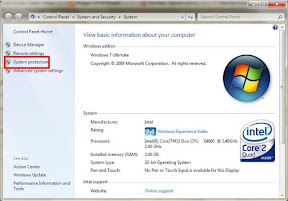
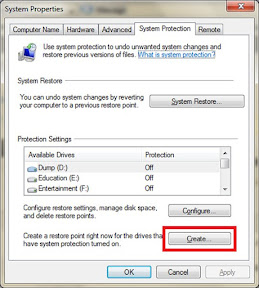
Manual creation of System Restore point involves following steps..

Step 1: Right Click on MyComputer And select properties.

Step 2: (XP users go to step 3)Now click on System Protection Link On Top of the left hand side.
Properties

Step 3: Select the system protection tab, and click on the create button.
Properties

Step 4: It will guide you through the wizard. Give the name of the restore point and press ok.


For automatic procedure of Creating Restore point Click me

Thats it...

Hope this helpss...

Comment below..

How to block a particular website..?

There are many software's on the internet to block particular sites from viewing..

But the problem is, all those programs should be run in the background and will use some system resources, which results in the PC SLOW DOWN. So here is the procedure for blocking a website without any software.


Step 1: Navigate to C:\Windows\System32\drivers\etc (where c is my Windows OS Installation drive)

Step 2: Then right click on the file HOSTS and open it with notepad.

Step 3: See for the line "127.0.0.1 localhost", at the end of this line press Enter and add as 127.0.0.2 www.orkut.com if you want to block orkut and in the next line 127.0.0.3 www.facebook.com if you want to blocl facebook also and so on...
HOST File

Step 4: Save the file. If you have any problems in saving the file see this.


That's it.. you have done....

Hope this helps...

Comment below....