/*--Google Analytics--*/ /*--Google Analytics--*/

Remove user name from the start menu..?

In general name of the user is displayed in the start menu. To remove the name follow these registry steps.

Step 1:

Remove user name from the start menu..?

In windows XP generally, name of the user is displayed in the start menu. To remove the name follow these registry steps.

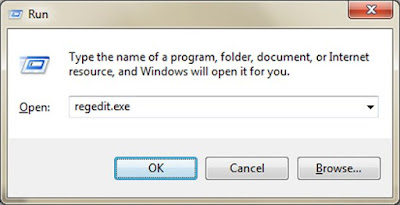
Step 1: Go to Run box by pressing Win+R button
Run Box

Step 2: Now type regedit.exe and press OK.

Step 3: Now Navigate to HKEY_CURRENT_USER\Software\Microsoft\Windows\CurrentVersion\Policies\Explorer and then create a DWORD with name NoUserNameInStartMenu and with value 1.

That's it.. Restart the system...

Say thanx if u dont know this previously...

No icons and start menu on the desktop when booting..?

There are some case due to viruses that you cannot see any icons or even the start menu on the desktop.
Then Follow these steps:

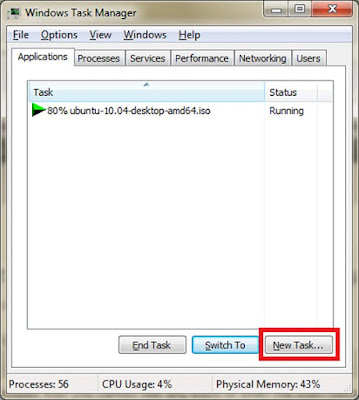
Step 1: Open the task manager by pressing Ctrl+Alt+Delete.

Step 2: Then Click On the New Task
Task Manager

Step 3: Then type regedit.exe and press ok, to open the registry editor.

Step 4: In the left panel navigate to HKEY_LOCAL_MACHINE\SOFTWARE\Microsoft\Windows NT\CurrentVersion\Image File Execution Options

Step 5: After clicking on the "Image File Execution Options" you will find 2 Subkeys on the right panel with names "explorer.exe" and "iexplorer.exe" right click on those keys and press delete.

That's It... Now Restart the system..


NOTE : This method works if the problem is due to virus. If it not works it may due to the corruption of the file explorer.exe.

How to create a DWORD in registry

There are many times windows users are required to create new DWORD's in registry..

Here is the procedure for creating a DWORD


Step 1: Go to Run box by pressing Win+R button
Run Box

Step 2: Now type regedit.exe and press OK.

Step 3: Now navigate to the required path and Right Click on the open area select New---> DWORD (32 Bit) Value
DWORD Creation

Step 4: Then give the name for it, every DWORD has its own value, to change the value double click on it. Then a popup will come through which you can set the value.
DWORD Value


Thats It...
Its a simple thing, anyhow if you learn some thing then say thanks....

No icons and start menu on the desktop when booting..?

There are some case due to viruses that you cannot see any icons or even the start menu on the desktop.
Then Follow these steps:

Step 1: Open the task manager by pressing Ctrl+Alt+Delete.

Step 2: Then Click On the New Task
Task Manager

Step 3: Then type regedit.exe and press ok, to open the registry editor.

Step 4: In the left panel navigate to HKEY_LOCAL_MACHINE\SOFTWARE\Microsoft\Windows NT\CurrentVersion\Image File Execution Options

Step 5: After clicking on the "Image File Execution Options" you will find 2 Subkeys on the right panel with names "explorer.exe" and "iexplorer.exe" right click on those keys and press delete.

That's It... Now Restart the system..


NOTE : This method works if the problem is due to virus. If it not works it may due to the corruption of the file explorer.exe.

How To Delete A Friend In Orkut

There are some times in which we have to delete the friends in our orkut account. Here is the step by step procedure for that..

Step 1: Login to your Account
Step 2: In the friends panel on the right click on the manage button
Orkut Delete Friend
Step 3: Then select the check box for whom you want to delete.
Step 4: Then, from the "actions" Drop down menu select remove friends.
Step 5: Press OK in the popup.

Thats it..

Say thanks If you like the post...

Send Free Sms To The World Using Small Desktop Application

Here is a small application from which you can send sms all around the world(maximum). To maximum number of providers..

Free SMS www.mydoubts.wordpress.com


Download Link
http://www.ziddu.com/download/9909678/FreeSMS_1.4.8.exe.html

Download & Enjoy..